
Google Tag Gateway: The Brief Guide to Recovering Lost Tracking Signals

UK digital marketing teams face an ongoing attribution crisis. Between Apple’s Intelligent Tracking Prevention (ITP), browser-level ad blockers, and network privacy shields, client-side tracking scripts routinely lose between 15% and 30% of conversion data.
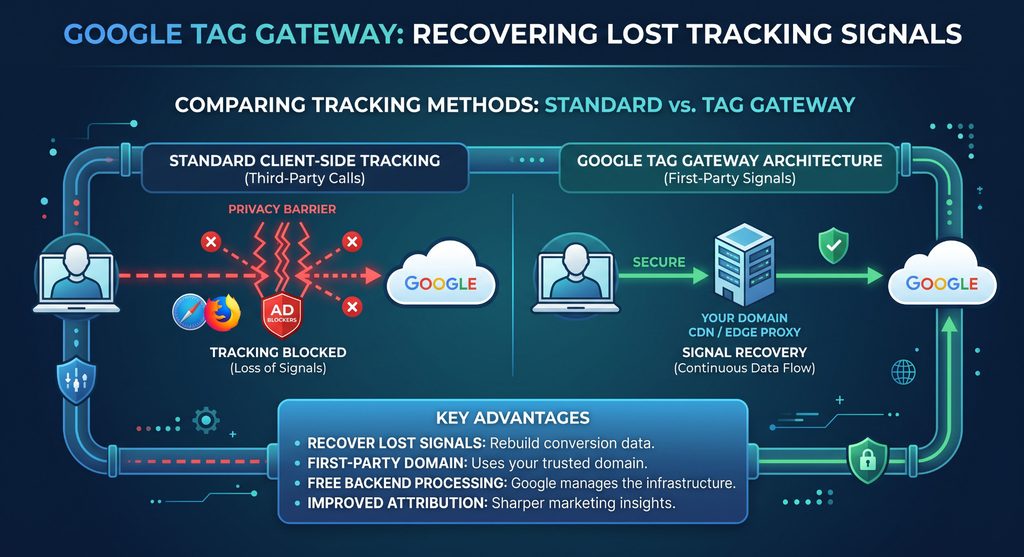
Google Tag Gateway is Google’s turnkey solution to this problem, allowing businesses to route Google Analytics 4 and Google Ads tags through their own first-party domain without the overhead of full server-side infrastructure.
How Google Tag Gateway Works
Standard analytics setups rely on browsers fetching third-party scripts from googletagmanager.com or google-analytics.com. Ad-blockers and privacy-focused browsers block these domains by default.
Google Tag Gateway introduces a reverse proxy hosted directly on your Content Delivery Network (CDN) or edge server (such as Cloudflare, Fastly, or Akamai).
- First-Party Script Delivery: Your website requests scripts from a path on your own domain (e.g.,
rawmedia.co.uk/metrics/gtag.js). - Edge Routing: The CDN receives incoming user hits and forwards them securely to Google’s ingestion servers.
- Data Continuity: Because requests are first-party HTTP calls, they bypass standard third-party domain blocklists.
Tag Gateway vs. Client-Side vs. Full Server-Side GTM
| Feature | Standard Client-Side | Google Tag Gateway | Server-Side GTM (sGTM) |
| Setup Overhead | 5 minutes | 15–30 minutes (CDN connection) | Days (Cloud run/GCP architecture) |
| Running Cost | Free | Free (uses existing CDN bandwidth) | £40–£200+/month hosting fees |
| Ad Blocker Bypass | ❌ Blocked | ✅ High recovery rate | ✅ Full recovery |
| Multi-Platform Support | All pixels | ❌ Google ecosystem only | ✅ Meta, TikTok, Pinterest, CRM |
| Payload Control & PII | None | Automatic routing only | Full payload hashing & redaction |
| Cookie Lifespan Control | 1–7 days (ITP) | Standard JavaScript scope | Extended (HTTP-only Server Cookies) |
UK Compliance & Consent Considerations
Routing tracking calls through your own domain does not exempt your website from UK GDPR or the Privacy and Electronic Communications Regulations (PECR).
- Consent Mode v2 Integration: Google Tag Gateway respects Google Consent Mode flags. If a user rejects analytical or advertising cookies via your CMP (Consent Management Platform), ping behaviour adjusts accordingly.
- Transparency: Your privacy policy must clearly state that analytics telemetry is routed via first-party edge proxies to Google data centres.
- Data Sovereignty: Ensure your CDN provider keeps data routing compliant with standard UK/EU-to-US data transfer mechanisms.
Step-by-Step Implementation
- 1. Access Google Tag Settings: In Google Tag Manager or GA4, navigate to Admin > Data Streams > Configure Tag Settings > Google Tag Gateway.
- 2. Define Serving Path: Set a custom first-party routing path on your primary domain, such as
/data-collectoror/gtg. - 3. Deploy CDN Worker/Rules: Authenticate your CDN provider (e.g., Cloudflare automated app integration) or manually apply the provided edge routing rules.
- 4. Test & Validate: Use Chrome DevTools (Network tab) or Google Tag Assistant to verify that your measurement payload URLs now originate from your custom domain rather than Google endpoints.
For businesses looking to bridge the gap between fragile client-side tags and high-maintenance server containers, Google Tag Gateway delivers immediate signal recovery with virtually zero infrastructure cost. It provides marketing teams with cleaner attribution, sharper Google Ads bidding signals, and more reliable analytics while keeping implementation straightforward.